Month: May 2019

  • Create custom shapes in PowerPoint

    PowerPoint 2010 has a new feature that’s very hard to find, but that people are praising over and over. It’s called Custom Shapes, and it’s a set of four tools that you can use to create your very own shapes. Why do you need Custom Shapes?

    • To make your slides unique.
    • For the flexibility to communicate your message in the way that works best for you and your audience.
    • For a professional, designer (custom-made) look.

    Usually, Microsoft highlights new features, but the Custom Shapes tools aren’t even on the ribbon! As a result, many people don’t know about them. First, I’ll tell you how to add them to your Quick Access toolbar, which is at the top-left corner of your PowerPoint window.

    At the right of the Quick Access toolbar, click the down arrow and choose More Commands.
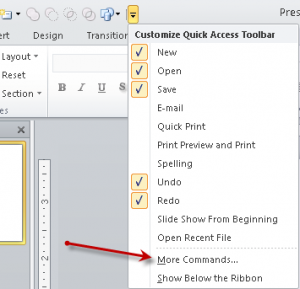
    In the PowerPoint Options dialog box, you’ll see a Choose Commands From drop-down list at the top. Choose Commands Not in the Ribbon to make the Custom Shape commands easier to find.

    Scroll down the list of commands until you get to “Shapes.” You’ll see 4  commands–Shape Combine, Shape Intersect, Shape Subtract, and Shape Union. Select Shape Combine and click Add. Do the same with the other 3 commands that start with “Shape.”

    Click OK to close the PowerPoint Options dialog box. The commands are now on the Quick Access toolbar.

    What can you do with these tools? Almost anything! Here’s a quick summary:

    1. Union adds two shapes together
    2. Subtract subtracts them; select the one you want to keep first
    3. Intersect keeps just the intersection between the two if they overlap
    4. Combine cuts out the intersection between multiple shapes but also makes the result a freeform so you can edit points

    In this post, I’ll show you a simple example using the Shape Union command.

    How to use Union to create a simple custom shape

    Let’s say that you want to create a SmartArt diagram, but can’t find the shape you want. You want a space for a small, circular photo at the left, some text in the middle, and an arrow at the right. Here’s what you sketched on a napkin:

    Here are the steps to create this shape:

    1. Insert a circle. (Remember, you can press Shift as you drag the circle on the slide to make sure it’s a perfect circle, not an oval.)
    2. Insert a rectangle to the right of the circle. Resize and move it so that it looks like the above image. You’ll see the outline around each shape, but don’t worry about that now.
    3. Insert an isosceles triangle. To get the shape you want, you need to rotate it to the right. Press Shift and drag the little green rotation circle to the right. Then resize and move the triangle so that it matches up to the right side of the rectangle.

    Your shapes should look like this:

    1. Select all 3 shapes and click Shape Union on the Quick Access toolbar. (The command button isn’t active unless you select at least 2 shapes.)

    Your new, custom shape looks like this:

    Go ahead and add a photo (I added another circle on top and filled it with the photo) and text. You can add text to it, just like any shape that comes with PowerPoint!

    Here’s the final result:

    Now go forth and create your own custom shapes!
  • Psychological Safety

    At the Adobe Summit I saw a great talk around the importance of psychological safety in the workplace and how critical it is to high performing teams. So important in fact that Google launched a 2 year investigation that lead to it.

    Over two years they conducted 200+ interviews with Googlers (their employees) and looked at more than 250 attributes of 180+ active Google teams. They were pretty confident that they’d find the perfect mix of individual traits and skills necessary for a stellar team — take one Rhodes Scholar, two extroverts, one engineer who rocks at AngularJS, and a PhD. Voila. Dream team assembled, right?

    They were dead wrong. Who is on a team matters less than how the team members interact, structure their work, and view their contributions. So much for that magical algorithm.

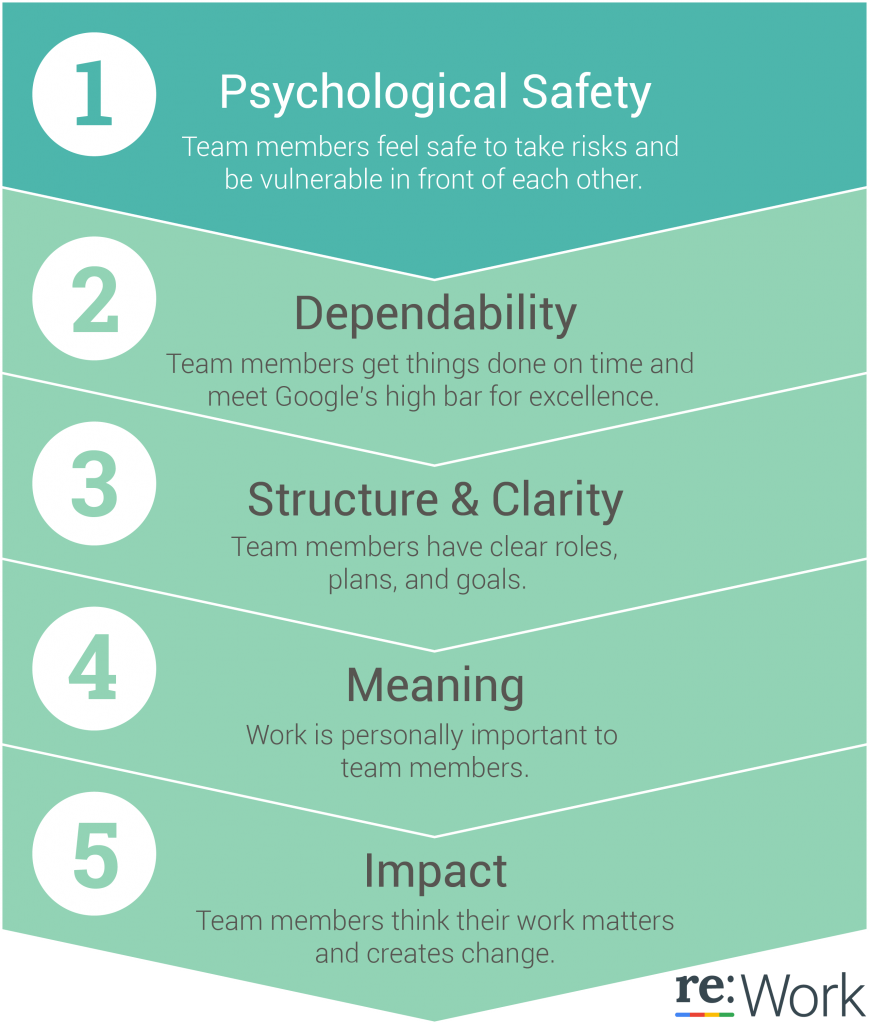
    They learned that there are five key dynamics that set successful teams apart from other teams at Google:

    1. Psychological safety: Can we take risks on this team without feeling insecure or embarrassed?
    2. Dependability: Can we count on each other to do high quality work on time?
    3. Structure & clarity: Are goals, roles, and execution plans on our team clear?
    4. Meaning of work: Are we working on something that is personally important for each of us?
    5. Impact of work: Do we fundamentally believe that the work we’re doing matters?

    If you answered “yes” to the five questions above, congrats! You’re probably on a high-performing team. And if not, not all hope is lost. This is a shortcut to help you figure out where to focus, how to get better, and a way to talk about this concept with your teammates in a structured way.

    Psychological safety was far and away the most important of the five dynamics they found — it’s the underpinning of the other four. How could that be? Taking a risk around your team members seems simple. But remember the last time you were working on a project. Did you feel like you could ask what the goal was without the risk of sounding like you’re the only one out of the loop? Or did you opt for continuing without clarifying anything, in order to avoid being perceived as someone who is unaware?

    Turns out, we’re all reluctant to engage in behaviors that could negatively influence how others perceive our competence, awareness, and positivity. Although this kind of self-protection is a natural strategy in the workplace, it is detrimental to effective teamwork. On the flip side, the safer team members feel with one another, the more likely they are to admit mistakes, to partner, and to take on new roles. And it affects pretty much every important dimension we look at for employees. Individuals on teams with higher psychological safety are less likely to leave Google, they’re more likely to harness the power of diverse ideas from their teammates, they bring in more revenue, and they’re rated as effective twice as often by executives.

  • Justice Index and LGBT Rights Worldwide

    During the Adobe Summit Amal Clooney, who was truly inspirational, talked about how they’re trying to use data to build a ‘justice index’ showing the quality of the justice system and laws in each country and how they change over time. The idea is that by being able to track this they would attempt to take action against countries where this measure was starting to decline.

    While not part of this project there’s a really interesting tool that’s been developed by the World Justice Project, not to be confused with DC Comics Justice Leauge! The tool shows the quality of the justice system in each county as a map visualisation here, they have far more detailed radar graphs by county here which you can click in to and see even more detail on.

    Something I find quite powerful when talking to people who aren’t aware is as of March 2019 it is still illegal to be gay in 70 countries! There are currently 6 UN Member States that impose the death penalty on consensual same-sex sexual acts, and a further five States where such a punishment is technically possible. In 26 other countries the maximum penalty can vary between 10 years to a life imprisonment.

    As a result there are many places I’m not willing to travel due the the risk I would face, places such as Dubai I could be sentenced to death and places like the Caribbean I could be sentenced to life in prison. I also wouldn’t risk travelling to places like Russia, Turkey or Egypt where I have no legal rights. The map below highlights as of March 2019 the legal status for LGBT rights around the world.

  • What’s the difference between a good rebel and a bad one?

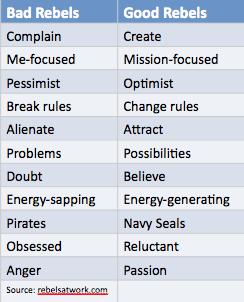
    During the Adobe Summit a speaker referenced an article from “Rebels at Work” citing their definition of what makes up a ‘bad rebel’ and a ‘good rebel’ which I found a really interesting concept.

    How many people in your team, who are ‘rebels’ are rebels for the good or the bad reasons? Or how often have you been guilty of falling in to the bad rebel camp. Worth thinking about how you can be a better good rebel or bear it in mind when developing your team or hiring.